
|
Locked out from admin |
Post Reply 
|
| Author | |
spectre 
Newbie 
Joined: 30-March-2009 Status: Offline Points: 0 |
 Post Options Post Options
 Thanks(0) Thanks(0)
 Quote Reply Quote Reply
 Topic: Locked out from admin Topic: Locked out from adminPosted: 23-August-2009 at 11:40am |
|
I have been using product cart for a client for about 4 months with no problems getting into the admin. Yesterday, I went to login and it gives me this error.
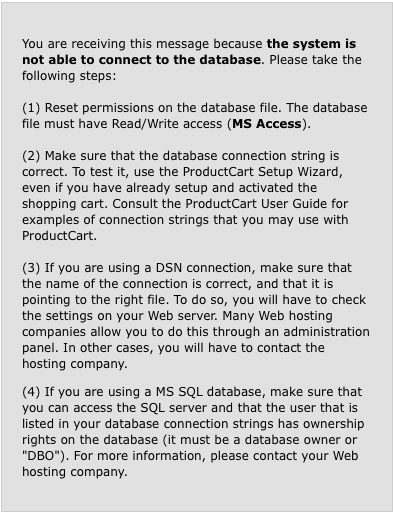 So I went through these, string is fine and my MS SQL database has a connection and site is up working fine but cant login to the admin. I emailed tech support and was told my CPLogs needed to have file permissions set to internet or everyone. So I set it to everyone. Still no change cant login to admin. I have not changed anything that would affect it so I dont know how to fix...so any help or guidence would be most appricated. Also, why doesnt teck support have an number to call. Very frustrating... |
|
 |
|
|
Matt
Moderator Group 
Joined: 20-July-2006 Location: United States Status: Offline Points: 73 |
Post Options
Thanks(0)
Quote Reply
Posted: 23-August-2009 at 11:50am |
|
Hi spectre, I am working on your ticket. You indicated that you have set permissions with FTP or desktop software, which does not work in most cases. So I asked you have your host set the permissions. Since this issue has been reported many times and it has always been the file permissions it does not make sense to take any additional action until you reply. Please reply to your open ticket and I will be happy to continue assisting you. We can arrange a call if it is needed.
|
|
|
|
|
Greg Dinger
Certified ProductCart Developers

Joined: 23-September-2006 Location: United States Status: Offline Points: 238 |
Post Options
Thanks(0)
Quote Reply
Posted: 23-August-2009 at 11:52am |
|
<<<I have not changed anything that would affect it so I dont know how to fix...so any help or guidence would be most appricated.>>>
With that said, did you change ANYTHING? This is a general purpose error message that will appear in some cases and have NOTHING to do with the database connection. So, did anything change before this occurred?
|
|
|
|
|
spectre
Newbie
Joined: 30-March-2009 Status: Offline Points: 0 |
Post Options
Thanks(0)
Quote Reply
Posted: 23-August-2009 at 11:59am |
|
Hey that would be great to do a call. I did contact network solutions about the file persmissions and 2 different people there told me that you dont set file permissions on a windows server...not knowing I cant cant argue that. So it left me with trying to change the permissions on the CPLog directory and that did nothing.
Here is what I was working on prior to trying to login. I updated the contact.asp page with additional form fields along with the languages.asp file to include the names for those fields. The evening before I started to use the built in content management and made a resources page through the admin. |
|
|
|
|
Greg Dinger
Certified ProductCart Developers
Joined: 23-September-2006 Location: United States Status: Offline Points: 238 |
Post Options
Thanks(0)
Quote Reply
Posted: 23-August-2009 at 12:06pm |
|
Updating the contact.asp page, particularly adding new columns, could easily result in an error that throws the dberror.asp page.
You may find it in your best interests to host with someone who actually understands ProductCart so that you don't get inane responses such as you describe.
|
|
|
|
|
spectre
Newbie
Joined: 30-March-2009 Status: Offline Points: 0 |
Post Options
Thanks(0)
Quote Reply
Posted: 23-August-2009 at 12:08pm |
|
I'm quickly understanding that...I always have copies so I will revert back to see if that does it.
|
|
|
|
|
spectre
Newbie
Joined: 30-March-2009 Status: Offline Points: 0 |
Post Options
Thanks(0)
Quote Reply
Posted: 23-August-2009 at 12:24pm |
|
Ok, I reverted both the languages.asp and contact.asp form back and I can get in. I should have done that to begin with...ugh, so thanks for the heads up! So obviously I didn't do something right or forgot a step when using the languages.asp file. I added in the Field text in numbered sequence to line up with the fields I added on the contact.asp page. Is there another file that I need to tweak to make this work to customize the fields on the contact page?
|
|
|
|
|
Greg Dinger
Certified ProductCart Developers
Joined: 23-September-2006 Location: United States Status: Offline Points: 238 |
Post Options
Thanks(0)
Quote Reply
Posted: 23-August-2009 at 12:45pm |
|
The contact page is far from simple to alter. I remember the first time I did so, thinking it was a 5-minute deal to send a few new fields, then spent the next 2 hours kicking myself for such an assumption.
There is insufficient context here as to what you were specifically trying to do, but this level of guidance is more than I can do here in the forum. If you need assistance, you should contact me (or any of the certified developers) directly and work out the details of the request.
|
|
|
|
|
spectre
Newbie
Joined: 30-March-2009 Status: Offline Points: 0 |
Post Options
Thanks(0)
Quote Reply
Posted: 23-August-2009 at 12:49pm |
|
Yep, I hear ya. I maybe doing that...
|
|
|
|
|
Post Reply
|
|
 Tweet
Tweet
|
| Forum Jump | Forum Permissions You cannot post new topics in this forum You cannot reply to topics in this forum You cannot delete your posts in this forum You cannot edit your posts in this forum You cannot create polls in this forum You cannot vote in polls in this forum |


 Topic Options